Have you ever bought a Steam game with high hopes only to find it wasn't quite what you expected? Or maybe it just didn't run well on your rig, even after tweaking? As gamers balancing life, work, and family, our free time is precious, and so is our hard-earned money. Understanding the Steam refund policy is crucial for making smart purchasing decisions and ensuring you get value for every dollar spent. This comprehensive guide will walk you through everything you need to know about getting a Steam game refunded, from eligibility requirements to the step-by-step process. We'll address common questions, debunk myths, and provide practical tips to help you navigate Steam's refund system with confidence, ensuring you never regret a digital purchase again. Learn how to maximize your gaming budget and avoid buyer's remorse, keeping your entertainment budget focused on games you truly love. This informational resource is designed for everyday US gamers seeking clear, actionable advice on Steam refunds.
Can I get a refund if my internet connection is too slow for the game?
While internet speed isn't explicitly listed as a refund reason, if slow connectivity makes a game unplayable or severely impacts the experience, you can submit a refund request explaining the situation. Steam Support considers requests on a case-by-case basis, especially when a game's online-only nature makes it unusable due to unforeseen technical limitations on the user's end, impacting the value for money.
How do I check the status of my Steam refund request?
You can check the status of your refund request by logging into your Steam account and going to Steam Support. Under the 'Purchases' section, you will see a history of your requests, along with their current status, such as 'Pending,' 'Approved,' or 'Refunded.' Steam also sends email notifications at each stage of the process, keeping you informed.
What if a game consistently crashes or has major performance issues?
If a game consistently crashes or has severe performance issues that prevent you from enjoying it, even after troubleshooting, you can absolutely request a refund. This falls under the 'product is faulty' category. Explain the technical problems in detail in your refund request, providing any error messages or troubleshooting steps you've already attempted. Steam generally aims to ensure a functional product.
Can I refund a game that was part of a bundle?
Refunding a game that was part of a bundle can be tricky. Steam's policy states that if the entire bundle meets the refund criteria (less than two hours played across all games in the bundle, owned for less than 14 days), the whole bundle can be refunded. Individual games within a bundle usually cannot be refunded separately unless specified by the bundle's terms. This policy considers the bundle as a single purchase.
Is there a way to appeal a denied Steam refund request?
If your refund request is initially denied, you can typically appeal the decision. When a request is denied, Steam Support will usually provide a reason. You can reply to their message within the support ticket, providing additional details, clarification, or evidence that might strengthen your case. A polite, clear, and well-reasoned appeal often results in a reconsideration, especially if you have new information to offer.
Does Steam refund gift purchases?
Yes, gift purchases can be refunded under specific conditions. If the gift has not been redeemed, the original purchaser can request a refund within 14 days of purchase. If the gift has been redeemed by the recipient, the recipient must initiate the refund request, and the game must meet the standard 14-day/two-hour play time rules. The refund typically goes back to the original purchaser's payment method.
What happens if I receive a game as a gift and want to refund it?
If you received a game as a gift and wish to refund it, you as the recipient must initiate the refund request through your Steam account. The game must still meet the standard 14-day ownership and less than two hours played criteria. The refund will then typically be issued back to the original gift giver's payment method or Steam Wallet, not to your account.
We've all been there. You finish a long day, finally settle down with your favorite beverage, fire up Steam, and impulsively buy that new game everyone's buzzing about. Fast forward an hour or two, and reality hits: the game isn't clicking, it's riddled with bugs, or maybe your rig just can't handle it. For many of us, especially the roughly 60% of US gamers who are juggling jobs, family, and other life commitments, gaming time and money are valuable resources. The last thing we need is buyer's remorse over a digital purchase. You might be wondering, can Steam game be refunded?
Absolutely! Steam has a remarkably user-friendly refund policy, designed to give you peace of mind. While the exact conditions might seem a little opaque at first glance, knowing the ins and outs can save you both frustration and money. With 87% of US gamers regularly engaging with their hobby, often for 10+ hours a week, and social gaming trends showing no signs of slowing down, ensuring your game library is full of titles you genuinely enjoy and that perform well is more important than ever. This guide is your trusted friend, here to demystify the Steam refund process, so you can spend less time worrying about bad buys and more time enjoying the games you love or finding new ones that truly fit your limited gaming schedule and budget.
We'll cover everything from the basic eligibility rules to tackling those trickier refund scenarios. Whether you've accidentally bought the wrong version, encountered performance issues that even your budget hardware upgrade couldn't fix, or just found that the game's vibe wasn't for you, understanding how to navigate Steam's system is a game-changer. Let's dive in and make sure your Steam wallet is always working for you.
What are the basic eligibility requirements to refund a Steam game?
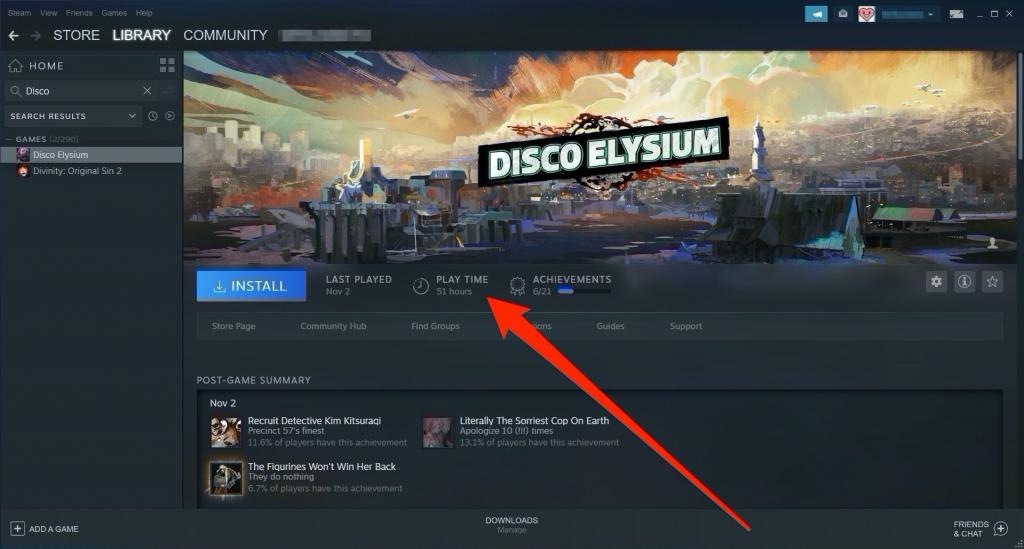
Steam's refund policy is quite generous and straightforward for most scenarios. For a game to be eligible for a refund, you generally need to meet two main criteria. First, the request must be made within 14 days of the purchase date. Second, you must have played the game for less than two hours. Both conditions must be met for a standard, automatic refund. This policy applies whether you bought the game yourself or received it as a gift. It's designed to let you try a game and quickly decide if it's for you without being stuck with a purchase you regret. Think of it as a brief demo period, perfect for those quick checks when balancing gaming with daily responsibilities.
How do I submit a refund request for a Steam game?
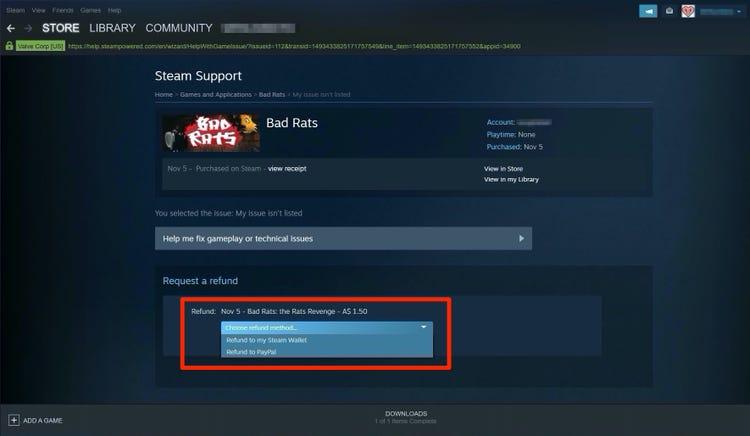
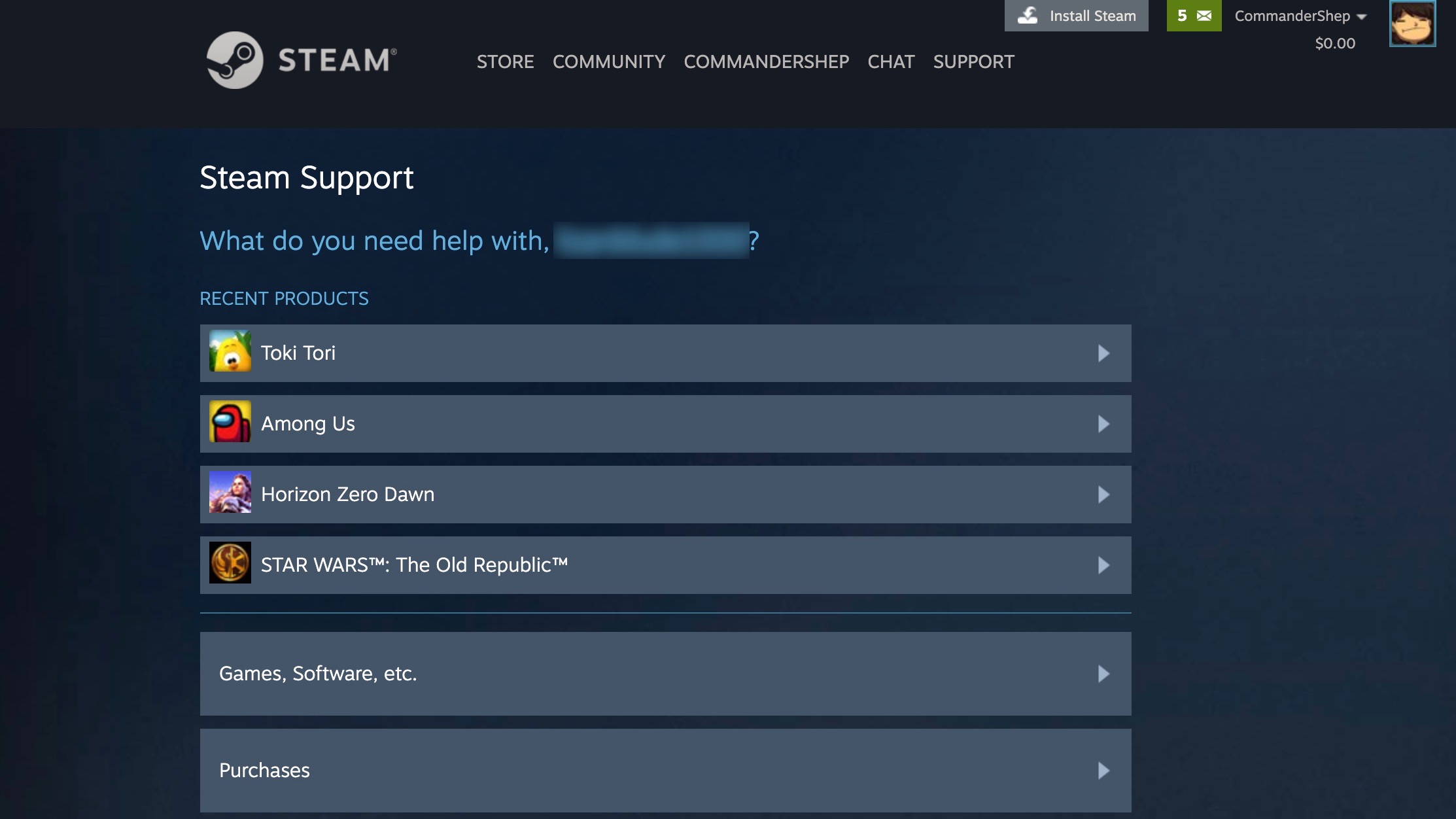
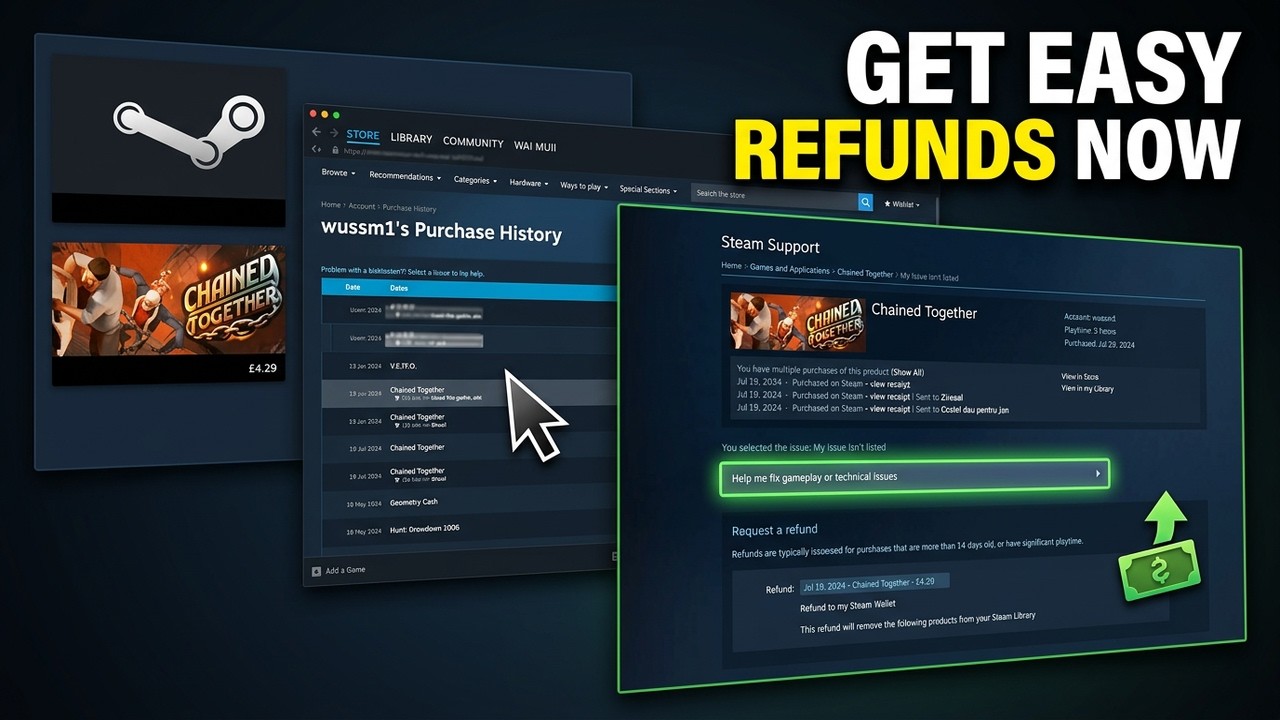
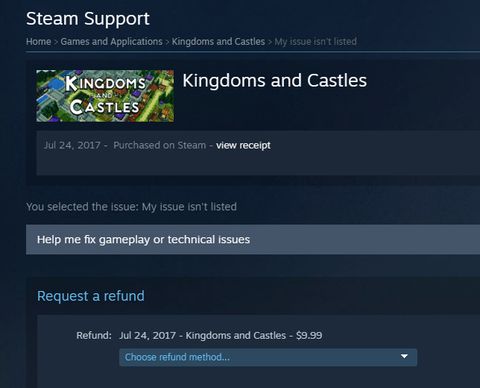
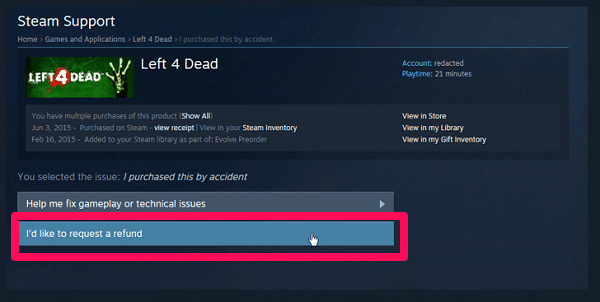
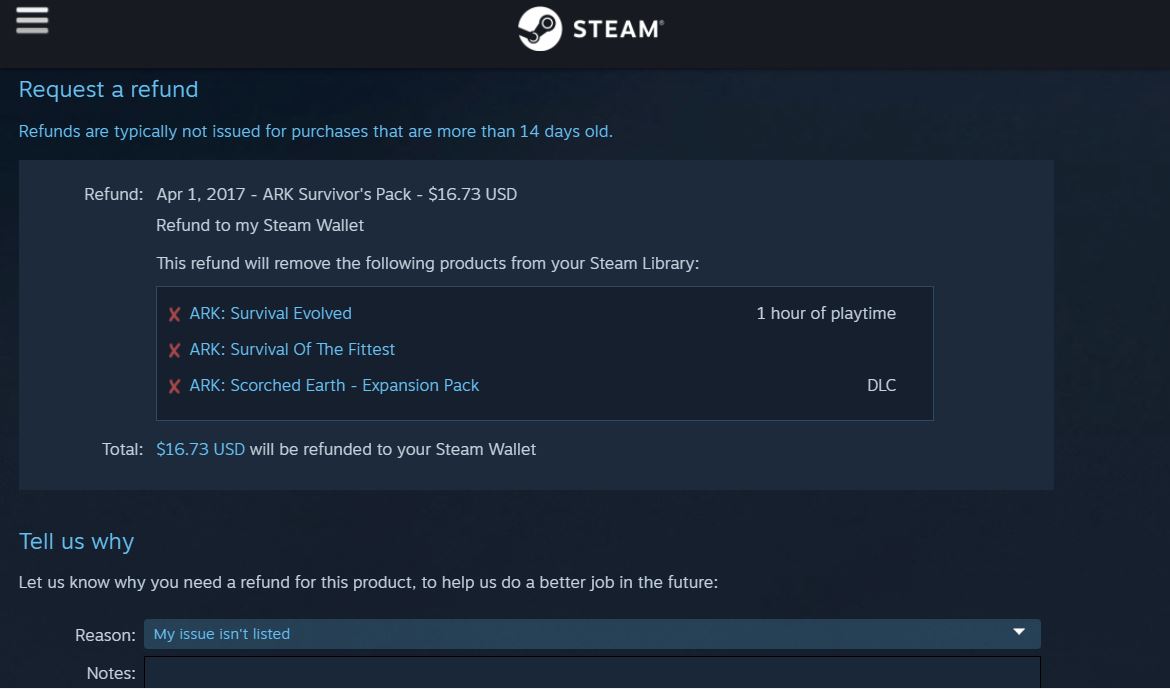
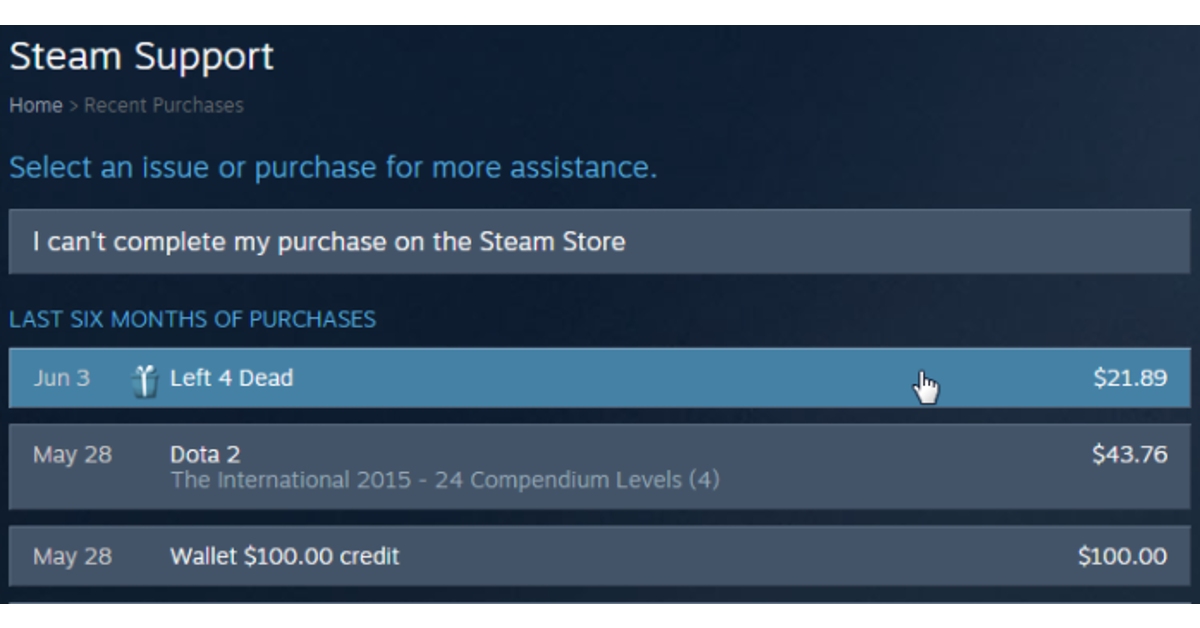
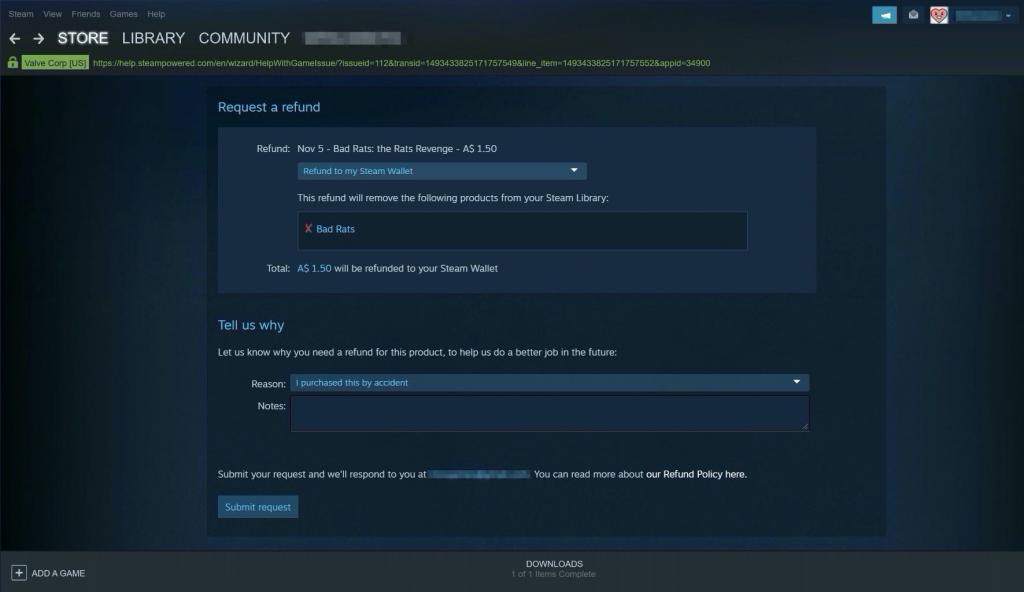
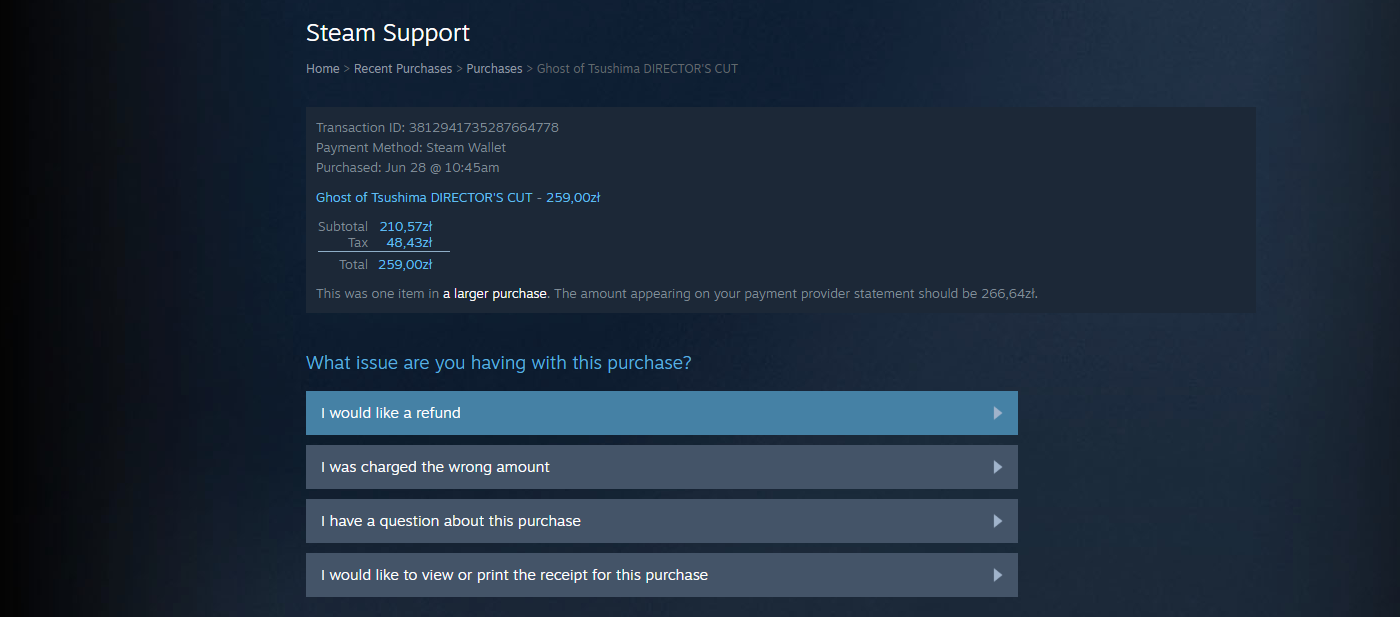
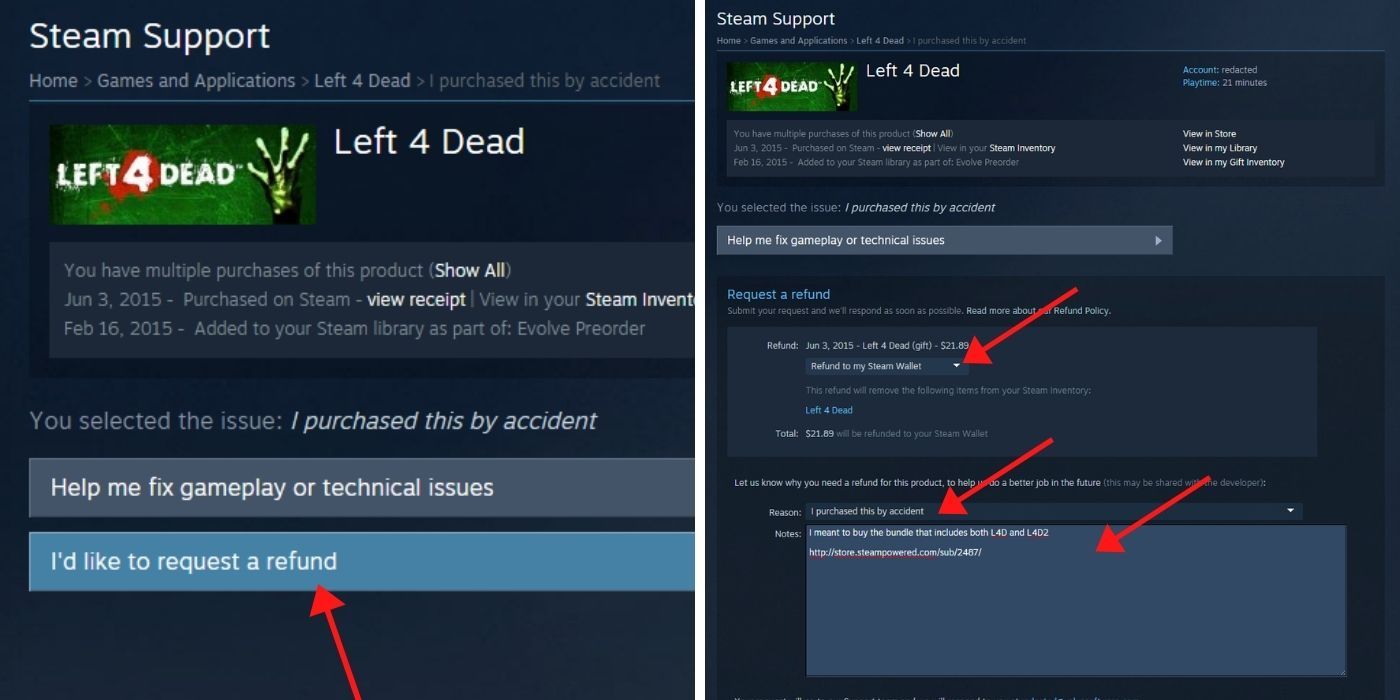
Submitting a refund request is a simple process that takes just a few clicks. First, log into your Steam account and navigate to Steam Support. You can find this by clicking on 'Help' in the top menu bar within the Steam client, then selecting 'Steam Support'. Once there, click on 'Purchases'. You'll see a list of your recent transactions. Find the game you wish to refund and click on it. On the next page, select 'I would like a refund' and then 'I would like to request a refund'. You'll be asked to choose a reason from a dropdown menu and provide a brief explanation. Finally, select where you'd like the refund to be sent (Steam Wallet or original payment method), and submit your request. Steam usually processes these requests fairly quickly, often within a few hours to a couple of days.
Can I refund a game if I've played more than two hours or owned it for more than 14 days?
While the 14-day and two-hour rules are the standard, Steam does consider exceptions, especially when unique circumstances arise. If you fall outside these windows, it doesn't automatically mean your refund request will be denied. Steam Support reviews each case individually, so it's always worth submitting a request with a clear, concise explanation. For example, if a game you purchased recently received a major update that broke its functionality, or if you discovered a critical bug that makes the game unplayable after the two-hour mark, you might still qualify. They are generally understanding of situations where a product is truly faulty or misrepresented, reflecting a commitment to value for money for their user base, many of whom are busy adults trying to enjoy their limited gaming time.
What about refunds for in-game purchases, DLC, or Season Passes?
Refunding in-game purchases, DLC (Downloadable Content), and Season Passes can be a bit more nuanced. Generally, the same 14-day/two-hour rule applies to DLC, provided the base game has not been played significantly since the DLC was purchased. If the DLC irreversibly modifies the game or consumes items, a refund might be harder to obtain. For in-game purchases of consumable items (like loot boxes or boosts), refunds are typically available if the item has not been used, modified, or transferred. Subscription services also have specific rules. It's always best to check the specific refund policy for the particular item on its store page, as some third-party integrations might have their own terms. Steam strives to be fair, recognizing that gamers want to invest wisely, whether it's in a new cozy game or a competitive title with microtransactions.
How long does it take to receive a Steam refund?
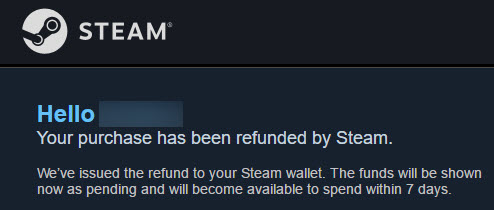
Once your refund request is approved, the time it takes to receive your money depends on the refund destination. If you choose to refund to your Steam Wallet, the funds are typically available within 24 hours, often much faster. If you opt for a refund to your original payment method (e.g., credit card, PayPal), it can take longer. Most banks and payment processors typically process these refunds within 7 to 10 business days. However, international payments or specific banking holidays can sometimes extend this period. Steam will send you an email confirmation when the refund is processed, so you'll know exactly when to expect the funds back. This quick turnaround helps gamers manage their budget effectively, especially when considering new releases or hardware upgrades.
Can I refund a game purchased during a Steam Sale?
Yes, games purchased during a Steam Sale are subject to the same refund policy as full-priced games. The 14-day and two-hour play time limits still apply. So, if you snagged a deal on a game during the recent Spring Sale but quickly realized it wasn't for you, you can still initiate a refund request as long as you meet the standard eligibility criteria. This is particularly helpful for budget-conscious gamers who might be more prone to impulse buys during major sales, hoping to find that next great experience without breaking the bank. It provides peace of mind, knowing that a discounted price doesn't forfeit your consumer rights.
What if a game is removed from the Steam store after I buy it?
If a game is removed from the Steam store after you've purchased it, your ability to play it typically remains unaffected. However, refund eligibility under such circumstances can be unique. If the game was removed due to technical issues, broken functionality, or a legal dispute that renders it unplayable, Steam is generally very accommodating with refunds, even if you've exceeded the standard play time or ownership window. This often falls under the 'product is faulty' exception. In these rarer cases, Steam Support will usually provide specific instructions or even proactively offer refunds to affected users, demonstrating their commitment to player satisfaction and fair practice.
Are there any games or items that cannot be refunded on Steam?
While Steam's refund policy is broad, there are a few exceptions. Gift purchases, once redeemed by the recipient, typically need to be initiated by the recipient, not the original buyer. Some third-party keys or CD keys activated on Steam but purchased elsewhere are generally not eligible for a refund through Steam, as the purchase was not made directly on their platform. Consumable in-game items that have been used or transferred are also often non-refundable. Additionally, if Steam detects abuse of the refund system (e.g., repeatedly buying games, playing for just under two hours, and then refunding), they reserve the right to deny future requests. This measure helps maintain fairness for all users, including the vast community of US gamers who enjoy social play and value a balanced ecosystem.
Conclusion
Navigating the world of digital game purchases can sometimes feel like a gamble, but with Steam's robust refund policy, it doesn't have to be. For the average US gamer, who values their limited time and carefully earned money, understanding how to refund a Steam game is an essential skill. By adhering to the 14-day and two-hour guidelines, and knowing when exceptions might apply, you empower yourself to make smarter gaming investments. No more being stuck with games that don't perform, don't engage, or simply don't fit into your busy life. This knowledge ensures your gaming journey remains a source of relaxation, fun, and skill-building, rather than regret.
What's your biggest gaming challenge when it comes to new purchases? Share your thoughts and experiences in the comments below!
FAQ Section
Can I refund a game if my PC cant run it?
Yes, if your PC doesn't meet the game's requirements and you haven't played more than two hours within 14 days of purchase, you can typically refund it. This is a common and valid reason for a refund, as technical compatibility is crucial for enjoyable gameplay.
How many refunds can I get on Steam?
There isn't a strict limit on the number of refunds you can request, but Steam monitors refund activity. If they suspect abuse of the system, such as buying games just to play them for under two hours and then refunding repeatedly, they may start denying requests.
What is Steam's refund policy on pre-ordered games?
Pre-ordered games can be refunded any time before the release date. Once the game is released, the standard 14-day/two-hour policy applies, starting from the release date itself, not your pre-order date. This offers flexibility for early adopters.
Can I refund a game if I bought it through a third-party seller?
Generally, no. Steam's refund policy primarily covers games purchased directly through the Steam store. If you bought a game key from a third-party retailer, you'll need to contact that retailer directly for their refund policy.
Does Steam refund money to my bank account or Steam Wallet?
When requesting a refund, you have the option to choose between a refund to your Steam Wallet or back to your original payment method. Steam Wallet refunds are usually faster, appearing within 24 hours, while bank refunds can take 7-10 business days.
What if I refunded a game by mistake and want to buy it again?
If you mistakenly refunded a game and wish to re-purchase it, you can simply do so from the Steam store. There are no penalties or blocks from re-acquiring a game you previously refunded, as long as you're making a legitimate new purchase.
Can I refund a VAC banned game?
No, games from which you have been VAC (Valve Anti-Cheat) banned are not eligible for refunds. This policy is in place to prevent players from circumventing bans by simply returning the game after being caught cheating.
Steam offers refunds for games played less than 2 hours and owned for under 14 days. The process is straightforward via Steam Support. Even if you fall outside these windows, there are exceptions, especially for technical issues or early access games. In-game purchases can also be refunded under specific conditions. Knowing the policy helps gamers manage purchases wisely.
35


How To Refund Steam Games Fast Easy Tutorial 2026 YouTube . How To Refund Games On Steam 2026 Refund A Steam Game YouTube . Best Ways How To Refund A Game On Steam Update 06 2026 Refund Game Steam . How To Refund Games On Steam 2026 Refund A Steam Game YouTube . How To Refund A Game On Steam In 2026 Common Refund Questions Refund Eng
Steam Early Access Games Can You Refund Them Steam Refund 1 . How To Refund A Game On Steam 2026 Guide Step By Step Image. How To Refund Games On Steam 2026 Refund A Steam Game YouTube . Everything You Need To Know About Steam Refunds Explained PC Gamer 480 80 . How To Refund Games On Steam 2026 YouTube




How To Refund A Game On Steam Refund Details . How To Refund Steam Games Even After You Ve Played Them. H Ng D N C Ch Refund Game Tr N Steam Chi Ti T 2026 Refund Game Steam 6 . How To Refund Steam Games Even After You Ve Played Them. How To Easily Refund Games On Steam Full Tutorial YouTube
:max_bytes(150000):strip_icc()/005_get-refund-on-steam-4161255-9a77df913208470fa9964dc5b53eff71.jpg)

How To Refund Steam Games In 2021 Get Steam Refund Easily Get A Refund On Steam . Everything You Need To Know About Steam Refunds Explained PC Gamer . How To Refund A Game On Steam 005 Get Refund On Steam 4161255 . How To Refund A Game On Steam 12 Steps With Pictures WikiHow Aid9176105 V4 728px Refund A Game On Steam Step 3 . Best Ways How To Refund A Game On Steam Update 05 2026 Refund Game Steam 2

:max_bytes(150000):strip_icc()/004_get-refund-on-steam-4161255-2e3cc788148441b8bf7a243c0437286e.jpg)
How To Get A Refund On Steam By Returning A Gam Select The Game You Want To Refund . H Ng D N C Ch Refund Game Tr N Steam Chi Ti T 2026 Steam Refund 1 . Best Ways How To Refund A Game On Steam Update 06 2026 Refund Game Steam 1 . Steam Early Access Games Can You Refund Them 004 Get Refund On Steam 4161255 . How To Return A Game On Steam Complete 2026 Refund Guide Technerdo Image



How To Refund A Game On Steam In 2026 Common Refund Questions Refund1 . How To Refund A Game On Steam Split Image Of Steam Support Page With Arrows Pointing To The Appropriate Boxes To Select On The Page And Shows How To Fill Out The Page In Which You Explain Why You Want A Refund. . How To Refund A Game On Steam A Step By Step Guide Gamezone Steam 1024x566 . How To Refund A Game On Steam 12 Steps With Pictures WikiHow Aid9176105 V4 728px Refund A Game On Steam Step 2 . How To Get A Refund On Steam Full Guide For 2026 Informer News Steam Summer Sale 2025 1024x675


How To Get A Steam Refund A Visual Step By Step Guide Steam Support Email Purchase Has Been Refunded 1495028442 . How To Refund A Game On Steam And Get Your Money Back 1 6245504 81km . How To Refund Steam Games A Step By Step Guide YouTube . How To Refund Steam Games Even After You Ve Played Them. STEAM GAME REFUND TUTORIAL How To Refund A Game On Steam Updated